By Kim · Facts checked 6 Nov 2026 · Setup and security guidance from Claude Code Docs
If you include prompt while expecting Claude to wait for a mention, you select automation mode instead. Claude runs without waiting for a mention, and results appear in the workflow run log by default. For a Claude Code GitHub Actions setup driven by mentions, omit prompt.
We recommend quick setup when you meet its prerequisites. Before installation, separate authentication from authorization: an API key or subscription token authenticates Claude, but installing the GitHub App accepts its full permission set. Workflow permissions need a separate review. Finish setup by checking an eligible actor’s mention and the same-thread reply, rather than stopping at the setup pull request.
Before you start, check access and credentials
- Confirm repository admin access before either setup path.
- For quick setup, confirm github.com hosting, Claude Code and an installed GitHub CLI authenticated with
gh auth login. - Choose an API key or subscription OAuth token and store it in the corresponding repository secret.
- Review the app’s full permission set and grant the workflow only the permissions it needs.
- Create and merge the setup pull request.
- For mentions, omit
prompt; check write access or the configured exception, plusallowed_botsfor a bot actor. - Review Claude’s changes before merging them.
- Finish by tagging
@claudein an issue or PR comment with an eligible actor and checking for the same-thread reply.
Choose quick setup for a github.com repository
Based on official documentation (checked 6 Nov 2026), choose quick setup when you have repository admin access, a github.com repository, Claude Code and an installed, authenticated GitHub CLI.
- Confirm admin access to the target repository and github.com hosting.
- Install the GitHub CLI and authenticate it with
gh auth login. - Open
claudein the repository, run/install-github-appand follow the prompts. - Complete the credential prompts; Claude Code saves the credential as a repository secret.
- Create and merge the setup pull request.
The documentation says @claude works in the repository after you create and merge that pull request. The mention-response check below is your final setup check, not a test we executed.
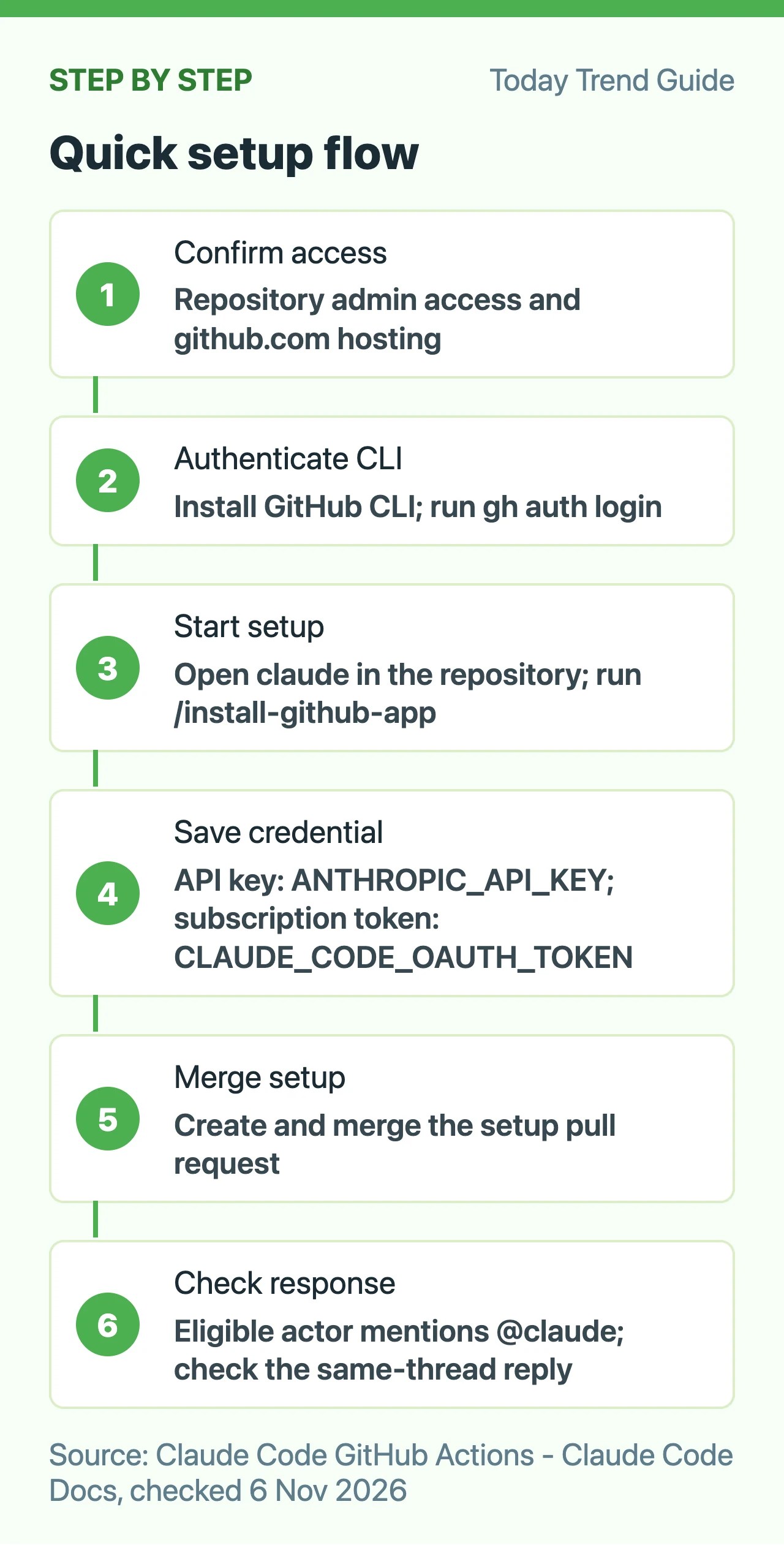
Choose the secret that matches your credential
Use ANTHROPIC_API_KEY for an API key or CLAUDE_CODE_OAUTH_TOKEN for a subscription OAuth token.
| Credential: API key |
Repository secret:ANTHROPIC_API_KEY |
Documented scope: Quick setup saves the API key as a repository secret |
| Credential: Subscription OAuth token |
Repository secret:CLAUDE_CODE_OAUTH_TOKEN |
Documented scope: Authenticates a Claude subscription on Pro, Max, Ultra, Team or Enterprise; generate locally with claude setup-token |
Note: Never commit API keys or OAuth tokens directly to the repository. Store them as GitHub Secrets and reference those secrets in workflows. The documented API-key reference is anthropic_api_key: ${{ secrets.ANTHROPIC_API_KEY }}.
Accept app permissions; restrict the workflow
Installing the app accepts its full permission set; restricting workflow permissions is a separate responsibility. GitHub doesn’t let you accept only a subset of the app’s permissions.
| Boundary: Permission used by the Action: Contents |
Documented access or action: Read and write for repository-file changes |
| Boundary: Permission used by the Action: Issues |
Documented access or action: Read and write for issue responses |
| Boundary: Permission used by the Action: Pull requests |
Documented access or action: Read and write for PR creation and pushed changes |
| Boundary: App installation |
Documented access or action: Accept the full permission set; review it before installation |
| Boundary: Workflow |
Documented access or action: Grant only the permissions it needs |
| Boundary: Change review |
Documented access or action: Review Claude’s changes before merging |
We treat the permissions used by the Action as distinct from the full installation decision. Subscription authentication doesn’t replace either permission review: its token authenticates your Claude subscription, while the app and workflow have their own access requirements.
Omit prompt; check actor eligibility and the reply
Omit prompt to use interactive mode, then check both the triggering actor’s eligibility and the same-thread response.
| Mode: Interactive |
Configuration: No prompt input |
Documented behavior: Waits for the trigger phrase, @claude by default, in an issue or PR comment, a PR review, or the body or title of a newly opened issue |
| Mode: Automation |
Configuration: A prompt input is present |
Documented behavior: Runs without waiting for a mention, remains subject to actor checks and puts results in the workflow run log by default |
For issue and pull request events, the triggering user must have repository write access. To allow specific users without write access, configure allowed_non_write_users and supply your own github_token input. On every event, bot actors are rejected unless listed in allowed_bots; write access alone doesn’t establish bot eligibility.
- Check that the mention workflow omits
prompt. - Choose an actor that meets the write-access rule or configured exception; for a bot, also check
allowed_bots. - Tag
@claudein an issue or PR comment. - Check for Claude’s comment on that same issue or PR; the documented example updates that comment as work proceeds.
If the expected reply doesn’t appear, we’d check the merged setup pull request, mode selection and actor eligibility before treating the workflow as ready.
Use concurrency controls to limit parallel runs
Use GitHub’s concurrency controls to limit parallel runs of the Claude Code GitHub Action.
Keep that operating control separate from authorization: grant the workflow only the permissions it needs and review Claude’s changes before merging.
Deny credential-file reads to protect history
Use permission rules to deny reads of credential files; GitHub Secret storage addresses a different credential-handling boundary.
Note: Claude Code transcripts and history aren’t encrypted at rest; OS file permissions are their only protection. If a tool reads a .env file or a command prints a credential, that value is written to projects/<project>/<session>.jsonl.
The catches: app access and mention eligibility
- Quick setup is limited to github.com repositories.
- You can’t accept only part of the GitHub App’s permission set.
- A
promptinput selects automation mode and doesn’t wait for a mention. - A bot’s write access doesn’t replace the requirement to list it in
allowed_bots.
Best for: Choose quick setup for a github.com repository when you have admin access and an authenticated GitHub CLI.
Good fit: You want guided setup, repository-secret handling and a setup pull request.
Not a fit: Choose manual setup if you want to install the app, add the secret and copy the workflow yourself.
| Repository access | Admin access is required for either setup path. |
|---|---|
| Quick setup | /install-github-app works only with github.com repositories. |
| Credential | API key: ANTHROPIC_API_KEY; subscription token: CLAUDE_CODE_OAUTH_TOKEN. |
| Mention mode | Omit prompt; the default trigger phrase is @claude. |
| Trigger eligibility | Issue and PR events require write access or the configured exception; bot actors also need allowed_bots. |
| Response check | Use an eligible actor to mention @claude in an issue or PR comment and check for a reply in that thread. |
Choose manual setup or automation when needed
- Manual setup: Choose this path when you want to configure the app, secret and workflow yourself instead of running
/install-github-app. Admin access is still required. Install the app, add a secret and copyexamples/claude.ymlinto.github/workflows/. - Automation mode: Choose this when the workflow should run from a
promptinput without waiting for a mention. Actor checks still apply, and results appear in the workflow run log by default.
- Exact app-installation and workflow-example destination URLs aren’t established here; consult the official documentation for the manual path’s complete workflow and OAuth input configuration.
- No numeric price, recommended turn limit or recommended timeout is established here.
Common questions
Can I stop Claude Code from writing transcripts and prompt history?
The documentation says to set CLAUDE_CODE_SKIP_PROMPT_HISTORY to skip writing transcripts and prompt history in any mode.
Is there a non-interactive session-persistence option?
In non-interactive mode, the documentation allows --no-session-persistence alongside -p.
Do the TypeScript and Python SDKs share that persistence option?
The TypeScript Agent SDK supports persistSession: false; the documentation says the Python SDK has no equivalent option.
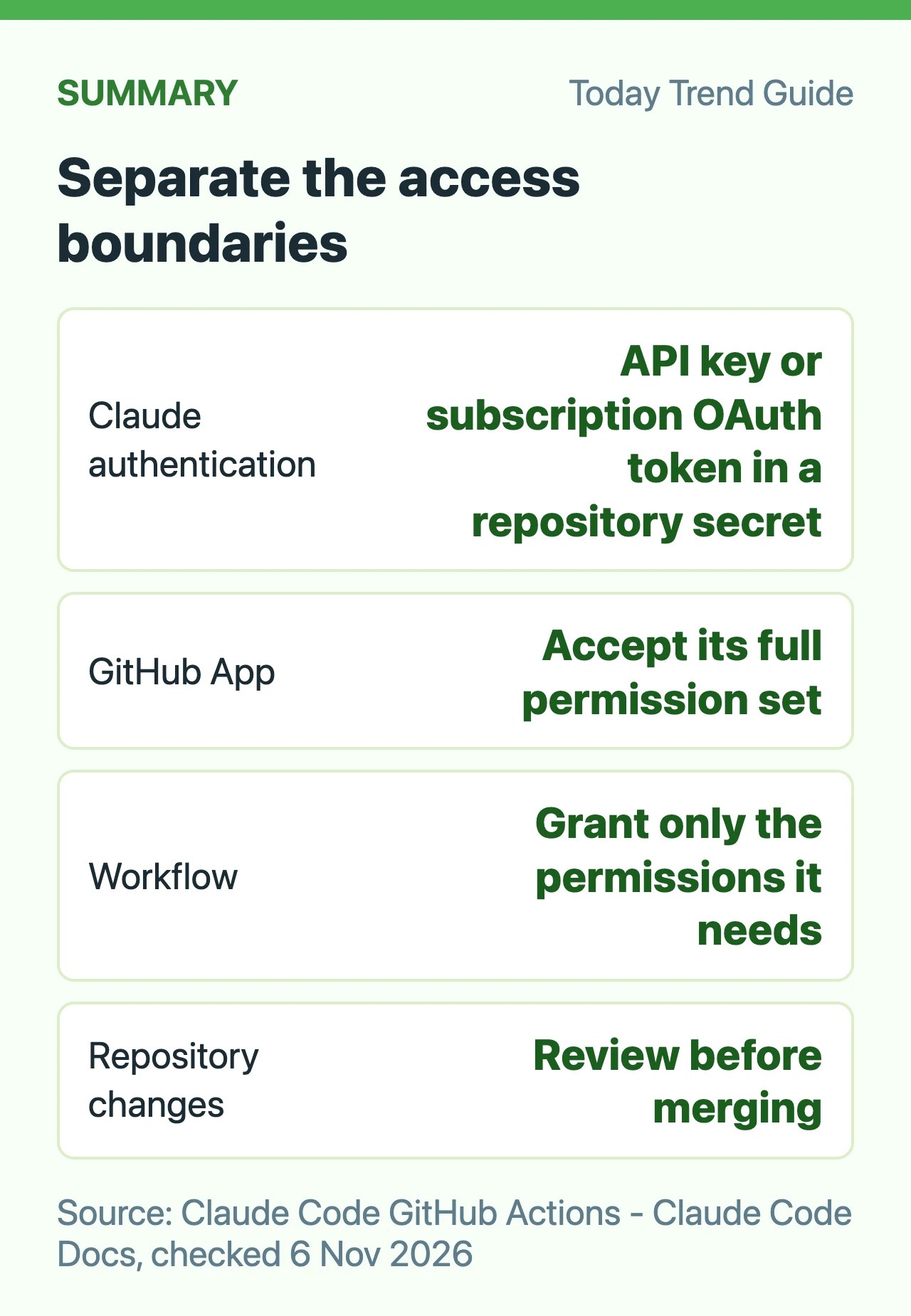
Keep API keys and OAuth tokens out of committed files: use GitHub Secrets, restrict workflow permissions and review Claude’s changes before merging.
Source list
- Claude Code GitHub Actions – Claude Code Docs (checked 6 Nov 2026)
- Claude Code Docs (checked 6 Nov 2026)
This guide draws on Claude Code GitHub Actions and Claude Code Docs (2 pages), and its figures were checked against that text. Facts last checked 6 Nov 2026.